
Shopify spy tool and product downloader for Chrome
Download every product from any Shopify store, see what it sells, how it is growing and which apps it runs, then import the winners into your store from Shopify, Amazon, Flipkart, Meesho, AliExpress, Allegro or Fruugo.
- Any public Shopify store
- No API key or Shopify app
- Every feature on the Starter plan
OrbiTags runs in Chrome on a computer. Open this page there to install it.

- Shopify stores
- Amazon
- Flipkart
- Meesho
- AliExpress
- Allegro
- Fruugo
One extension instead of three tools
Research, download and import without switching tools
Most sellers use one tool to spy on stores, another to export catalogs and a Shopify app to import products. OrbiTags does all three on the page you are already looking at.
Download any catalog
Every product and variant from any Shopify store, with images, prices, tags and collections. Export to Shopify CSV, WooCommerce CSV or JSON.
Shopify product scraperAnalyze any store
Traffic and its trend, best sellers and estimated sales, launches, prices, apps, theme, pixels and ads, plus a 0–100 store score.
Shopify spy toolImport in one click
An Import to Shopify button on 7 marketplaces. Every size and colour becomes a variant with its own price, stock and photo.
Product importerA closer look
Everything happens inside your browser
Download every product from any Shopify store
Sync a store and its whole catalog arrives in a searchable list: thousands of products and tens of thousands of variants, synced in the background while you work.
- Filter by collection, vendor, type, best selling, new, on sale and out of stock
- Export to Shopify CSV that imports as is, WooCommerce CSV or JSON
- Download all product images as a ZIP, and split big exports under Shopify's 15 MB limit

See how any competitor is really doing
A full report on any Shopify store in seconds: what it sells, how fast it launches, how its traffic is moving and where it is strong or weak.
- A 0–100 store score across SEO, catalog, trust, marketing, activity and performance
- Traffic rank with its 30-day trend, estimated visits, and estimated sales for the top 50 best sellers
- Prices, discounts, stock and launches over time, the store's ads in the Meta Ad Library, and an audit checklist
Know the theme and every app behind a store
OrbiTags reads theme app blocks, app embeds and third-party scripts, so it finds the reviews, email, loyalty, upsell and support apps a store relies on, grouped by job with their ratings.
- Theme name, version and the Theme Store theme it is built on
- Tracking pixels and every third-party script domain
- An alert when a tracked store adds an app or changes theme

Import winning products with every variant
The Import to Shopify button appears on product pages of 7 marketplaces. Review the title and photos, set your markup, round to .99 and add the product to your store as a draft.
- Each size and colour as a variant with its own price, stock and photo
- Prices converted to your store's currency, photos uploaded with live progress
- No Shopify app to install and no API key: it uses your own admin login

Supported marketplaces
Import to Shopify from the marketplaces you source from
Each importer is built for how that marketplace stores its products, so you get the variants the seller really offers.
How it works
From install to your first insight in a minute
- 1
Add to Chrome
Install OrbiTags from the Chrome Web Store and sign in with Google. Tick one box to accept the terms.
- 2
Open any Shopify store
A green mark on the icon shows the site runs on Shopify. Click it for traffic, apps, theme and best sellers.
- 3
Download, track or import
Sync and export the catalog, track the store for alerts, or import products straight into your store.
A quick panel on every Shopify store
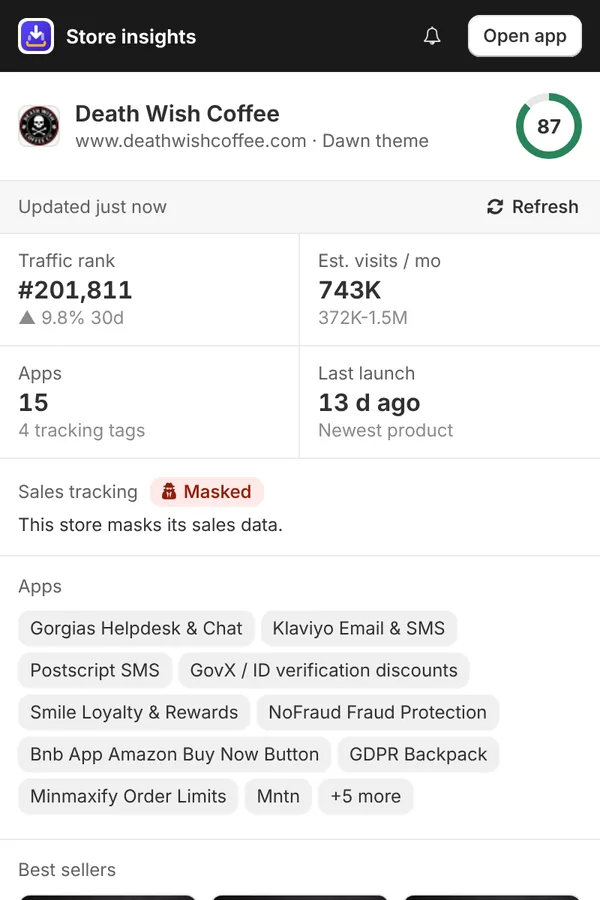
Click the toolbar icon on any store for its traffic rank and trend, estimated visits, number of apps and tracking tags, the newest launch and best sellers, then add it to your tracked stores in one click.
Alerts while you work
Tracked stores are checked automatically. Get a desktop notification for new products, price drops and rises, best sellers selling out or coming back, and app or theme changes.
Add to ChromeWho it is for
Built for people who sell on Shopify
Dropshippers
Find products that already sell in successful stores, check their price history and import them with every variant in one click.
Brand owners
Watch competitors' launches, prices and apps, benchmark your store's score and see what the leaders in your niche do differently.
Agencies & freelancers
Audit a prospect's store in seconds, export catalogs for migrations and show clients exactly how they compare.
Sellers in India
Move products from Flipkart and Meesho to your own Shopify store with all sizes, colours and per-size prices.
Privacy
Public data for research. Your login stays in your browser.
Store research reads only what a storefront shows every visitor. Importing uses your own Shopify admin session in Chrome, so no API keys or passwords are ever shared with us.
Read the Privacy Policy- No API keysNothing to create or paste in your Shopify admin.
- You decideOne clear agreement at sign-in. Customer personal data is never read.
- We do not sell your dataAsk for a copy or deletion at any time by email.
FAQ
Questions sellers ask
What does OrbiTags do?
OrbiTags is a Chrome extension for Shopify sellers. It downloads every product from any Shopify store to Shopify CSV, WooCommerce CSV or JSON, analyzes a store's traffic, best sellers, apps, theme and ads, tracks competitors with alerts, and imports products into your own Shopify store from Shopify stores, Amazon, Flipkart, Meesho, AliExpress, Allegro and Fruugo.
Do I need a Shopify API key or to install a Shopify app?
No. Store research uses only the public data a storefront shows to every visitor. Importing uses your own Shopify admin session in Chrome, so there is no app to install in your store and no API key to paste.
Which browsers does it work in?
Google Chrome on desktop, and other Chromium browsers that install extensions from the Chrome Web Store, such as Microsoft Edge and Brave. Browser extensions do not run on phones.
How do I download all products from a Shopify store?
Open the store, click Sync in OrbiTags, then Export and choose Shopify CSV, WooCommerce CSV or JSON. You can filter by collection, vendor, type, best selling, new, on sale or out of stock first.
Can I see another Shopify store's sales and traffic?
You can see estimates: traffic rank with its 30-day trend, estimated monthly visits, and estimated units and revenue for the store's top 50 best sellers. They are built from public signals and clearly labelled as estimates.
How do I import products from Amazon, Flipkart or Meesho to Shopify?
Sign in to your Shopify admin in Chrome, open the product page on the marketplace and click Import to Shopify. Every size and colour becomes a variant with its own price, stock and photo, converted to your store's currency.
Is my data safe?
Research reads only public storefront pages. When you sign in you choose whether to agree to the data use described in our Privacy Policy; customer personal data from your store is never read, and we do not sell your data.
How much does it cost?
You can start on the Starter plan, which includes every feature, without a card. See pricing for the current plans.
Guides
Learn the fastest way to do it

Start researching Shopify stores today
Add OrbiTags to Chrome, open any Shopify store and see what it sells, runs and earns.